
 Image: Maria Diaz / ZDNet
My attention goes from screen to screen all day without even realizing it. Working on the computer, then checking my phone, sending a message on my iPad, and watching TV at the end of the day -- my eyes feel exhausted just typing this out. I like to give my eyes a break now and then, but with things like working on a computer being inevitable, I resort to taking advantage of little breaks here and there, like using my Mac on dark mode.
Dark mode lightens the burden on my eyes, kind of like a dark room is better for a headache. Though there is no conclusive evidence on whether it's actually better for your eyes, I find using dark mode decreases eye strain and can also extend your battery life.
How to make Mac dark mode
Step 1: Go to System Preferences
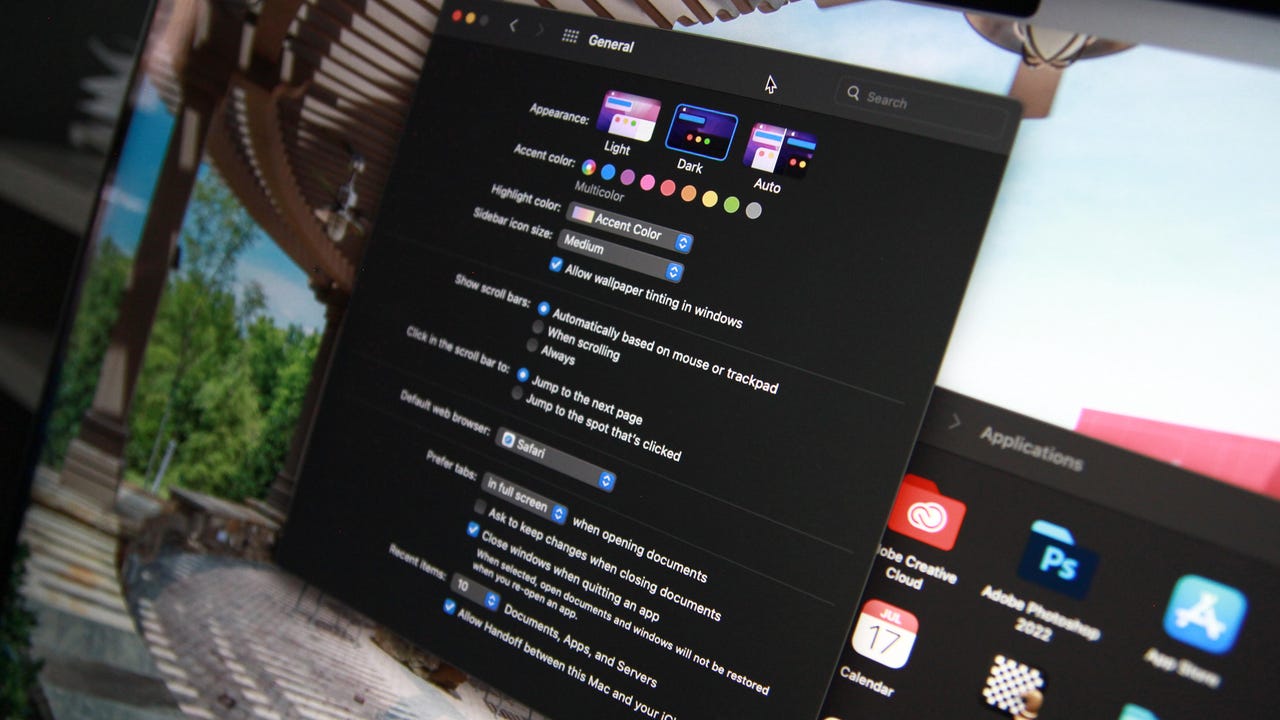
From the Apple menu at the top left of your screen on your Mac, select System Preferences.
Step 2: Click General
On the window for your system preferences, select General.
Step 3: Click Dark
When you select Dark, your window will change instantly.
Image: Maria Diaz / ZDNetGeneral settings include appearance, scroll bar settings, default browser, and more, so if you've never explored these settings, now's a good time to customize your Mac.
When you click on Dark, your Mac's buttons, menus, and windows will take on a darker appearance. If you choose Auto, your Mac will stay on Light mode and gradually transition to Dark throughout the day.
Also read: Using your iPhone in high temperatures can cause permanent damage
FAQ
Can you use dark mode on your iPhone?
You can also choose Light or Dark mode or Auto for both iPhone and iPad, just by going to Settings, then choosing Display & Brightness.
More how-tos
-
How to use iPhone's Security Keys feature to protect your Apple ID
-
How to tighten your security in Microsoft Edge
-
How to screen record in Windows 10 or Windows 11
-
How to configure Safari tabs to automatically close in MacOS Sonoma