
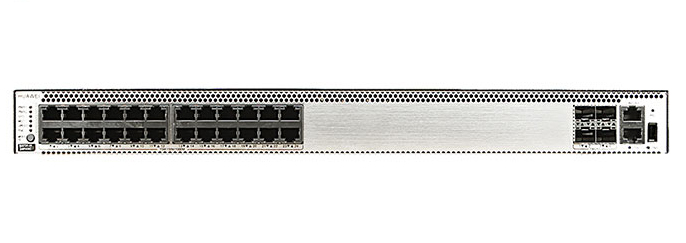
Overview of Huawei S5731-H24P4XC
The Huawei S5731-H24P4XC is a next-generation full-Gigabit Ethernet switch designed for enterprise campus networks, SME aggregation, and access scenarios. Part of the Huawei CloudEngine S5731-H series, this switch integrates intelligent O&M, enhanced security, and advanced Layer 3 routing capabilities into a compact and energy-efficient form factor.
With full PoE++ support, intelligent energy management, and native compatibility with Huawei CloudCampus solutions, the S5731-H24P4XC stands out as a future-proof option for enterprises upgrading their IT infrastructure to meet the demands of cloud era networking.
Key Technical Specifications
Model: S5731-H24P4XC
Part Numbers: 02352QPV (Standard), 02352QPV-001, 02352QPV-003
Ports: 24 x 10/100/1000BASE-T PoE++ ports, 4 x 10GE SFP+ uplink ports
Power Supply: Dual hot-swappable power modules (AC or DC options)
Switching Capacity: 336 Gbit/s
Forwarding Performance: 252 Mpps
MAC Address Table: 32K
VLANs: 4K
Dimensions (W × D × H): 442 mm × 420 mm × 44.4 mm
PoE Power Budget: Up to 740W depending on power module configuration
Fan Module: Pluggable, front-to-back airflow
Mounting: Rack-mountable (1U standard)
Key Features
▪ Delivers 24 PoE++ ports supporting up to 60W per port, ideal for high-power IoT and Wi-Fi 6 APs.
▪ Includes 4 x 10GE SFP+ uplinks for high-speed aggregation and flexible network topology.
▪ Supports both Layer 2 switching and Layer 3 routing with rich enterprise-grade features.
▪ Enables intelligent O&M through iMaster NCE-Campus for network visibility and automation.
▪ Redundant power and fan modules ensure carrier-grade reliability.
▪ VXLAN support and EVPN for large-scale virtualized network deployment.
▪ MACsec hardware-based encryption secures data at the link layer.
▪ Delivers energy efficiency with dynamic power management and fan speed adjustment.
▪ Offers cloud-based management and plug-and-play deployment via CloudCampus platform.
Advanced PoE++ Capability
One of the standout capabilities of the S5731-H24P4XC is its IEEE 802.3bt-compliant PoE++ support. Each of the 24 access ports can deliver up to 60W per port, making the switch ideal for powering high-consumption devices such as:
▪ Wi-Fi 6 (802.11ax) access points
▪ High-performance IP cameras
▪ Multimedia terminals and digital signage
▪ Industrial IoT devices
Combined with an intelligent power scheduling engine, the switch optimizes energy usage and maintains stable power delivery under varying load conditions.
Performance and Hardware Design
The Huawei S5731-H24P4XC boasts 336 Gbit/s switching capacity and 252 Mpps packet forwarding rate. This enables non-blocking performance for demanding enterprise workloads and high-density environments.
Key hardware features include:
▪ Compact 1U form factor suitable for rack installations
▪ Front-to-back airflow design optimized for data center deployments
▪ Dual modular power slots supporting AC and DC redundancy
▪ Four independent fans for efficient cooling and thermal management
Such industrial-grade design ensures long-term operational stability and fault tolerance in mission-critical environments.
Security and Compliance
Security is a top priority in modern enterprise networking, and Huawei equips the S5731-H24P4XC with multiple built-in security mechanisms:
▪ MACsec: Secure data transmission with link-layer encryption
▪ 802.1X authentication: Enables identity-based access control
▪ DHCP snooping: Prevents rogue DHCP servers from compromising network integrity
▪ ARP inspection: Detects spoofing attacks and ensures IP integrity
▪ Traffic filtering: ACL-based filtering enhances user-level segmentation
Compliance with IEEE and Huawei-specific security protocols ensures robust protection for enterprise users and sensitive assets.
Cloud-Managed Network Integration
The S5731-H24P4XC supports Huawei’s CloudCampus Solution, enabling cloud-based orchestration, policy control, monitoring, and automated O&M. Through iMaster NCE-Campus, administrators can:
▪ Visualize network topology and endpoint behavior in real time
▪ Configure switches remotely with zero-touch provisioning
▪ Implement intelligent policy deployment based on user roles
▪ Monitor PoE usage, temperature, and fan performance
This centralized management greatly reduces TCO and improves operational agility across branches or large campuses.
Layer 3 Routing and Virtualization
Beyond Layer 2 switching, the S5731-H24P4XC integrates rich Layer 3 routing protocols such as:
▪ OSPF, BGP, and IS-IS for dynamic route learning
▪ IPv6 unicast and multicast forwarding
▪ VRRP for gateway redundancy
Moreover, the switch supports VXLAN and EVPN for network virtualization, enabling multiple tenants and scalable segmentation within a single physical infrastructure—ideal for enterprise data centers and managed networks.
Energy Efficiency and Environmental Adaptability
Huawei has incorporated multiple energy-saving technologies in the S5731-H24P4XC:
▪ Dynamic PoE scheduling to reduce idle port power usage
▪ Intelligent fan control for thermal adaptation and noise reduction
▪ IEEE 802.3az Energy-Efficient Ethernet
Environmental specifications include:
▪ Operating Temperature: 0°C to 50°C (long term)
▪ Relative Humidity: 5% to 95% non-condensing
▪ Noise Level: < 52 dB in standard mode
Deployment Scenarios
The S5731-H24P4XC is optimized for use in a variety of enterprise-grade scenarios:
▪ Campus Network Access: Connects high-density endpoints such as APs, IP phones, and video terminals
▪ Enterprise Branch Aggregation: Aggregates access switches from multiple offices into core backbone
▪ Smart Buildings: Provides PoE++ power to security systems, lighting, and automation devices
▪ Industrial and IoT Edge: Robust enough to handle harsh, high-power device environments
Conclusion
The Huawei S5731-H24P4XC is a comprehensive, intelligent switch tailored for enterprise environments demanding high throughput, robust PoE delivery, and simplified management. With its blend of Layer 2/3 capabilities, advanced security, virtualization, and cloud integration, it positions itself as a cornerstone of next-generation IT infrastructure.
Whether you're scaling up a digital campus, upgrading to Wi-Fi 6, or designing a smart building, the S5731-H24P4XC is equipped to deliver stable performance, secure connectivity, and future-proof design.
Huawei CloudEngine Switch S5731-H24P4XC
Huawei All Series Switches New and Used
For Huawei product list and quote, please visit: https://www.hi-network.com/categories/huawei or contact us at www.hi-network.com (Email: [email protected])
S5731-H24P4XC (02352QPV/02352QPV-001/02352QPV-003)
Version Mapping
Table 4-1486 lists the mapping between the S5731-H24P4XC chassis and software versions.
Table 4-1486 Version mapping
| Series | Model | Software Version |
|---|---|---|
| S5731-H | S5731-H24P4XC | 02352QPV: V200R013C02 and later versions02352QPV-001: V200R020C10 and later versions02352QPV-003: V200R021C10SPC600 and later versions (If V200R021C10SPC500 is used, install V200R021HP0121 or a later patch. If V200R021C00SPC100 is used, install V200R021SPH013 or a later patch.) |
Appearance and Structure
Figure 4-581 S5731-H24P4XC (02352QPV) appearance

Figure 4-582 S5731-H24P4XC (02352QPV-001/02352QPV-003) appearance

| 1 | Twenty-four PoE+ 10/100/1000BASE-T ports | 2 | Four 10GE SFP+ portsApplicable modules and cables:GE optical moduleGE-CWDM optical moduleGE-DWDM optical moduleGE copper module (100M/1000M auto-sensing)10GE SFP+ optical module (OSXD22N00 not supported)10GE-CWDM optical module10GE-DWDM optical modulePEN remote optical modules (V200R024C00 and later versions)1 m, 3 m, 5 m, and 10 m SFP+ high-speed copper cables3 m and 10 m SFP+ AOC cables0.5 m and 1.5 m SFP+ dedicated stack copper cables (used for zero-configuration stacking) |
| 3 | One console port | 4 | One ETH management port |
| 5 | One USB port | 6 | One PNP buttonNOTICE:To restore the factory settings and reset the switch, hold down the button for at least 6 seconds.To reset the switch, press the button.Resetting the switch will cause service interruption. Exercise caution when you press the PNP button. |
| 7 | Ground screwNOTE:It is used with a ground cable. | 8 | Rear card slotNOTE:Applicable card:ES5D21X08T00ES5D21Q02Q00S7X08000 (02312URW) (applicable in V200R019C10 and later versions)S7X08000 (02312URW-002) (applicable in V200R021C10SPC600 and later versions)S7Q02001 (02313UBW) (applicable in V200R021C01 and later versions)S7Q02001 (02313UBW-002) (applicable in V200R021C10SPC600 and later versions) |
| 9 | Fan module slot 1NOTE:Applicable fan module: FAN-023A-B (Fan Box (B, Fan Panel Side Exhaust)) | 10 | Fan module slot 2NOTE:Applicable fan module: FAN-023A-B (Fan Box (B, Fan Panel Side Exhaust)) |
| 11 | Power module slot 1NOTE:Applicable power module:PAC1000S56-CB (02312KND: 1000 W PoE AC&240 V DC Power Module)PAC1000S56-CB (02312KND-001: 1000 W PoE AC&240 V DC Power Module) (applicable in V200R019C10 and later versions)PAC1000S56-DB (1000 W PoE AC&240 V DC Power Module) (applicable in V200R020C10 and later versions)PDC1000S56-CB (1000 W PoE DC Power Module) (applicable in V200R021C00 and later versions)PAC600S56-CB (600 W PoE AC&240 V DC Power Module (Back to Front, Power panel side exhaust)) (applicable in V200R021C10 and later versions) | 12 | Power module slot 2NOTE:Applicable power module:PAC1000S56-CB (02312KND: 1000 W PoE AC&240 V DC Power Module)PAC1000S56-CB (02312KND-001: 1000 W PoE AC&240 V DC Power Module) (applicable in V200R019C10 and later versions)PAC1000S56-DB (1000 W PoE AC&240 V DC Power Module) (applicable in V200R020C10 and later versions)PDC1000S56-CB (1000 W PoE DC Power Module) (applicable in V200R021C00 and later versions)PAC600S56-CB (600 W PoE AC&240 V DC Power Module (Back to Front, Power panel side exhaust)) (applicable in V200R021C10 and later versions) |
Port Description
10/100/1000BASE-T port
A 10/100/1000BASE-T Ethernet electrical port sends and receives service data at 10/100/1000 Mbit/s, and must use an Ethernet cable. Table 4-1487 describes the attributes of a 10/100/1000BASE-T Ethernet electrical port.
Table 4-1487 Attributes of a 10/100/1000BASE-T Ethernet electrical port
| Attribute | Description |
|---|---|
| Connector type | RJ45 |
| Standards compliance | IEEE802.3, IEEE802.3u, IEEE802.3ab |
| Working mode | 10/100/1000 Mbit/s auto-sensing |
| Maximum transmission distance | 100 m |
10GE SFP+ optical port
A 10GE SFP+ Ethernet optical port supports auto-sensing to 1000 Mbit/s. It sends and receives service data at 1000 Mbit/s or 10 Gbit/s. Table 4-1488 describes the attributes of a 10GE SFP+ Ethernet optical port.
Table 4-1488 Attributes of a 10GE SFP+ port
| Attribute | Description |
|---|---|
| Connector type | LC/PC |
| Optical port attributes | Depend on the optical module used |
| Standards compliance | IEEE802.3ae |
| Working mode | GE/10GE auto-sensing |
Console port
The console port is connected to a console for on-site configuration. The port must use a console cable. The console port is used when a switch is powered on for the first time. For details about the attributes of a console port, see Table 4-1489.
Table 4-1489 Attributes of a console port
| Attribute | Description |
|---|---|
| Connector type | RJ45 |
| Standards compliance | RS-232 |
| Working mode | Duplex Universal Asynchronous Receiver/Transmitter (UART) |
| Baud rate | 9600 bit/s, 19200 bit/s, 38400 bit/s, 57600 bit/s, or 115200 bit/sDefault value: 9600 bit/s |
ETH management port
You can connect a switch to a configuration terminal or network management workstation through the ETH management port to configure the switch locally or remotely. The port must use an Ethernet cable. You can choose to download the software package through the ETH management port in the BootLoad menu. File transfer through the ETH management port is faster than transfer through the console port. Table 4-1490 describes the attributes of an ETH management port.
Table 4-1490 Attributes of an ETH management port
| Attribute | Description |
|---|---|
| Connector type | RJ45 |
| Standards compliance | IEEE802.3 |
| Working Mode | 10/100 Mbit/s auto-sensing |
| Maximum transmission distance | 100 mIn V200R012C00 and later versions, you can log in to the switch that contains the ETH management port for the first time through the ETH port. For details, see "First Login to a Switch" in the Configuration Guide - Basic Configuration. If you have logged in to the switch for the first time by pressing and holding the MODE button for 6 seconds or longer and saved the configuration, the default configuration on the ETH port will be cleared. In this case, you cannot log in to the switch for the first time through the ETH port. You are advised to log in to the switch for the first time through the ETH port. |
USB port
The USB port can have a USB flash drive connected to upgrade the switch, or transfer configuration files or other files. The USB port can only connect to a USB flash drive that complies with USB 2.0.
USB flash drives from different vendors differ in model compatibility and drivers. If a USB flash drive cannot be used, try to replace it with another one from a mainstream vendor. Switches support a maximum of 128 GB USB flash drives.
Indicator Description
The S5731-H24P4XC has the same types of indicators as the S5731-H48P4XC. For details, see Indicator Description.
Power Supply Configuration
The switch is a PoE switch and supports two power module slots, each of which can have a 1000 W PoE or 600 W PoE power module installed. Pluggable AC and DC PoE power modules can be used together in the same switch.
Table 4-1491 Power supply configurations
| Power Module 1 | Power Module 2 | Available PoE Power | Maximum Number of Ports (Fully Loaded) |
|---|---|---|---|
| 1000 W AC (220 V)1000 W DC | – | 760 W | 802.3af (15.4 W per port): 24802.3at (30 W per port): 24 |
| 1000 W AC (110 V) | – | 665 W | 802.3af (15.4 W per port): 24802.3at (30 W per port): 22 |
| 1000 W AC (220 V)1000 W DC | 1000 W AC (220 V)1000 W DC | 1600 W | 802.3af (15.4 W per port): 24802.3at (30 W per port): 24 |
| 1000 W AC (110 V)1000 W DC | 1000 W AC (110 V) | Versions earlier than V200R021C10: 1330 WV200R021C10 and later versions: 1520 W | 802.3af (15.4 W per port): 24802.3at (30 W per port): 24 |
| 600 W AC (220 V) | – | 380 W | 802.3af (15.4 W per port): 24802.3at (30 W per port): 12 |
| 600 W AC (110 V) | – | 95 W | 802.3af (15.4 W per port): 6802.3at (30 W per port): 3 |
| 600 W AC (220 V) | 600 W AC (220 V) | 950 W | 802.3af (15.4 W per port): 24802.3at (30 W per port): 24 |
| 600 W AC (110 V) | 600 W AC (110 V) | 380 W | 802.3af (15.4 W per port): 24802.3at (30 W per port): 12 |
| 1000 W AC (220 V)1000 W DC | 600 W AC (220 V) | 1330 W | 802.3af (15.4 W per port): 24802.3at (30 W per port): 24 |
When a switch has two power modules installed, the two power modules work in redundancy mode to provide power for the chassis and in load balancing mode to provide power for PDs.
Heat Dissipation
The S5731-H24P4XC uses pluggable fan modules for forced air cooling. Air flows in from the front side and exhausts from the rear panel.

This figure only shows the airflow direction and does not depict the actual device.
Technical Specifications
Table 4-1492 lists technical specifications of the S5731-H24P4XC.
Table 4-1492 Technical specifications
| Item | Description |
|---|---|
| Memory (RAM) | 4 GB |
| Flash | 1 GB in total. To view the available flash memory size, run the display version command. |
| Mean time between failures (MTBF) | 57.21 years |
| Availability | > 0.99999 |
| Service port surge protection | Common mode: ±6 kV |
| Power supply surge protection | Using AC power modules: ±6 kV in differential mode, ±6 kV in common modeUsing DC power modules: ±2 kV in differential mode, ±4 kV in common mode |
| Dimensions (H x W x D) | Basic dimensions (excluding the parts protruding from the body): 43.6 mm x 442.0 mm x 420.0 mm (1.72 in. x 17.4 in. x 16.5 in.)Maximum dimensions (the depth is the distance from ports on the front panel to the handle on the rear panel): 43.6 mm x 442.0 mm x 448.0 mm (1.72 in. x 17.4 in. x 17.7 in.) |
| Weight (with packaging) | 8.6 kg (18.96 lb) |
| Stack ports | 10GE SFP+ ports on the front panel, or ports on the rear card |
| RTC | Supported |
| RPS | Not supported |
| PoE | Supported |
| Rated voltage range | AC input: 100 V AC to 130 V AC, 200 V AC to 240 V AC, 50/60 HzHigh-Voltage DC input: 240 V DCDC input: -48 V DC to -60 V DC |
| Maximum voltage range | AC input: 90 V AC to 290 V AC, 45 Hz to 65 HzHigh-Voltage DC input: 190 V DC to 290 V DCDC input: -38.4 V DC to -72 V DC |
| Maximum power consumption (100% throughput, full speed of fans) | Not providing the PoE function: 121 W (without card)100% PoE loads: 977 W (PoE: 720 W, without card) |
| Typical power consumption (30% of traffic load, tested according to ATIS standard) | 95 W (without card) |
| Operating temperature | -5°C to +45°C (23°F to 113°F) at an altitude of 0-1800 m (0-5906 ft.)NOTE:When the altitude is 1800-5000 m (5906-16404 ft.), the highest operating temperature reduces by 1°C (1.8°F) every time the altitude increases by 220 m (722 ft.).The switch cannot be started when the ambient temperature is lower than 0°C (32°F). |
| Storage temperature | -40°C to +70°C (-40°F to +158°F) |
| Noise under normal temperature (27°C, sound power) | < 62.3 dB(A) |
| Relative humidity | 5% to 95%, noncondensing |
| Operating altitude | 0-5000 m (0-16404 ft.) |
| Certification | EMC certificationSafety certificationManufacturing certification |
| Part number | 02352QPV02352QPV-00102352QPV-003 |