
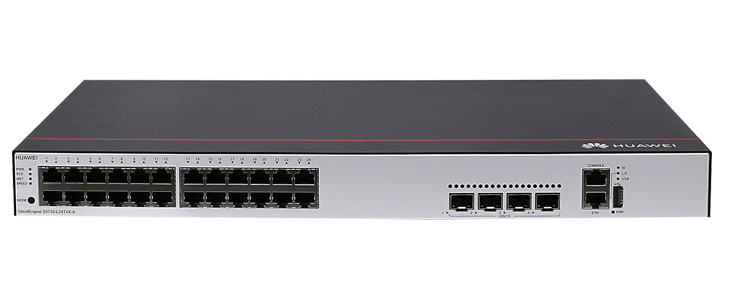
The S5735-L24T4X-A is an enterprise-class access switch developed by Huawei as part of the CloudEngine S5735-L series. It is designed to meet the needs of modern campus networks, branch offices, and enterprise access layers that require high reliability, flexible scalability, and strong security. With a compact design and powerful forwarding capabilities, this model is well suited for environments where stable wired access and high-speed uplinks are essential.
As enterprises continue to adopt cloud services, mobile workforces, and bandwidth-intensive applications, access-layer switches must deliver more than simple connectivity. The S5735-L24T4X-A addresses these demands by combining high port density, advanced Layer 2 and Layer 3 features, and intelligent network management capabilities. This makes it a practical choice for organizations seeking long-term network efficiency and simplified operations.
Product Positioning and Typical Use Scenarios
The S5735-L24T4X-A is positioned as an access-layer switch within enterprise campus architectures. It connects end-user devices such as PCs, printers, IP phones, wireless access points, and surveillance cameras to the aggregation or core layers of the network. Its design supports both small and medium-sized deployments as well as larger enterprise campuses when used in combination with other CloudEngine switches.
Enterprise Campus Networks
In campus environments, the switch provides stable wired access for office staff, classrooms, and meeting rooms. Its multiple Gigabit Ethernet ports allow simultaneous connections for numerous users, while 10 Gigabit uplink ports ensure sufficient bandwidth to upstream switches.
Branch Offices and Remote Sites
For branch offices, the S5735-L24T4X-A offers a balance between performance and cost efficiency. It supports centralized management and policy enforcement, enabling IT teams to maintain consistent configurations across distributed locations.
Hardware Architecture and Port Configuration
The hardware design of the S5735-L24T4X-A focuses on reliability and performance. Its fixed-port configuration simplifies deployment while still providing the flexibility required for enterprise networking.
Downlink and Uplink Ports
The switch is equipped with multiple Gigabit Ethernet electrical ports for end-device connectivity and high-speed uplink ports to connect to aggregation or core switches. This configuration ensures smooth traffic forwarding and minimizes bottlenecks at the access layer.
Compact and Energy-Efficient Design
The compact form factor allows the switch to be installed in standard equipment racks or wiring closets. Energy-efficient components and intelligent power management help reduce operational costs and support green networking initiatives.
Key Technical Specifications
The following specifications highlight the core technical capabilities of the S5735-L24T4X-A:
Ports: 24 x 10/100/1000BASE-T Ethernet ports, 4 x 10GE SFP+ uplink ports
Switching Capacity: High-performance switching fabric designed for enterprise access scenarios
Forwarding Performance: Line-rate forwarding to ensure minimal latency and packet loss
MAC Address Table: Large MAC address capacity for dense user environments
Power Supply: Built-in power module designed for stable operation
Cooling System: Intelligent fan design for efficient heat dissipation
Layer 2 Switching Capabilities
The S5735-L24T4X-A provides comprehensive Layer 2 features that ensure efficient traffic forwarding, loop prevention, and flexible network segmentation.
VLAN and Network Segmentation
Virtual LAN (VLAN) support enables logical segmentation of the network, improving security and reducing broadcast traffic. The switch supports multiple VLAN configurations, allowing administrators to separate departments, user groups, or services with ease.
Spanning Tree and Loop Prevention
Advanced spanning tree protocols help prevent network loops and ensure fast convergence in case of topology changes. This enhances overall network stability and reduces downtime.
Layer 3 Routing Features
Beyond basic switching, the S5735-L24T4X-A includes Layer 3 capabilities that allow it to perform routing functions at the access layer.
Static and Dynamic Routing
The switch supports static routing as well as dynamic routing protocols, enabling efficient inter-VLAN communication and simplified network design. This reduces reliance on upstream devices for routing tasks.
Optimized Traffic Forwarding
Layer 3 processing at the access layer helps reduce latency and improves overall application performance, especially in environments with high east-west traffic.
Security Features and Access Control
Security is a critical requirement in enterprise networks, and the S5735-L24T4X-A incorporates multiple mechanisms to protect users and data.
User Authentication and Authorization
The switch supports various authentication methods to ensure that only authorized users and devices can access the network. This helps prevent unauthorized access and enhances compliance with security policies.
Attack Defense and Traffic Protection
Built-in protection mechanisms help defend against common network attacks such as spoofing, flooding, and unauthorized scanning. These features contribute to a more resilient network environment.
Quality of Service and Traffic Management
Modern enterprise networks must handle diverse types of traffic, from voice and video to data and cloud applications. The S5735-L24T4X-A includes robust Quality of Service (QoS) features to ensure optimal performance.
Traffic Prioritization
QoS policies allow administrators to prioritize latency-sensitive applications such as voice and video. This ensures consistent user experiences even during periods of high network utilization.
Bandwidth Control
Flexible bandwidth management features help prevent individual users or applications from consuming excessive resources, maintaining fairness across the network.
Network Management and Maintenance
Efficient management is essential for reducing operational complexity and ensuring long-term network reliability.
Centralized Management
The S5735-L24T4X-A can be integrated into centralized management platforms, allowing administrators to monitor, configure, and maintain multiple devices from a single interface.
Monitoring and Diagnostics
Comprehensive monitoring and diagnostic tools provide real-time visibility into network performance, helping IT teams quickly identify and resolve issues.
Reliability and High Availability
Enterprise networks require continuous availability, and the S5735-L24T4X-A is designed with reliability in mind.
Stable Hardware Design
High-quality components and rigorous testing ensure stable operation under demanding conditions. This reduces the risk of unexpected failures.
Fast Fault Recovery
Support for fast convergence and fault detection mechanisms helps minimize service interruptions and maintain business continuity.
Energy Efficiency and Environmental Considerations
Energy efficiency is increasingly important for enterprises aiming to reduce costs and environmental impact.
Intelligent Power Management
The switch includes features that optimize power consumption based on traffic load and port usage, helping lower overall energy usage.
Eco-Friendly Design
Compliance with environmental standards ensures that the S5735-L24T4X-A supports sustainable IT initiatives.
Deployment and Configuration Simplicity
The S5735-L24T4X-A is designed to simplify deployment and reduce the time required to bring new network segments online.
Plug-and-Play Capabilities
Automated configuration features allow the switch to be quickly integrated into existing networks with minimal manual intervention.
Flexible Installation Options
The switch can be deployed in various environments, from wiring closets to data center edge locations, offering flexibility for different network designs.
Conclusion
The S5735-L24T4X-A is a versatile and reliable enterprise access switch that addresses the evolving needs of modern networks. With its robust hardware, comprehensive Layer 2 and Layer 3 features, strong security mechanisms, and efficient management capabilities, it provides a solid foundation for campus and branch network deployments. Organizations seeking a balance of performance, scalability, and operational efficiency will find the S5735-L24T4X-A to be a dependable solution for building secure and high-performing access-layer networks.
Huawei CloudEngine S5735 Switches
Huawei All Series Switches New and Used
For Huawei product list and quote, please visit: https://www.hi-network.com/categories/huawei or contact us at www.hi-network.com (Email: [email protected])
S5735-L24T4X-A
Version Mapping
Table 4-1152 lists the mapping between the S5735-L24T4X-A chassis and software versions.
Table 4-1152 Version mapping
| Series | Model | Software Version |
|---|---|---|
| S5735-L | S5735-L24T4X-A | V200R019C00 to V200R024C00 versionsNOTE:V200R021C01 is not supported. |
Appearance and Structure
Figure 4-454 S5735-L24T4X-A appearance

| 1 | Twenty-four 10/100/1000BASE-T ports | 2 | Four 10GE SFP+ portsApplicable modules and cables:GE optical moduleGE-CWDM optical moduleGE-DWDM optical moduleGE copper module (100M/1000M auto-sensing)10GE SFP+ optical module (OSXD22N00 not supported)10GE-CWDM optical module10GE-DWDM optical module1 m and 3 m SFP+ high-speed copper cables3 m and 10 m SFP+ AOC cables0.5 m and 1.5 m SFP+ dedicated stack copper cables (used for zero-configuration stacking, applicable in V200R019C10 and later versions) |
| 3 | One console port | 4 | One ETH management port |
| 5 | One USB port | 6 | One PNP buttonNOTICE:To restore the factory settings and reset the switch, hold down the button for at least 6 seconds.To reset the switch, press the button.Resetting the switch will cause service interruption. Exercise caution when you press the PNP button. |
| 7 | Ground screwNOTE:It is used with a ground cable. | 8 | Jack for AC power cable locking strapNOTE:The AC power cable locking strap is not delivered with the switch. |
| 9 | AC socketNOTE:It is used with an AC power cable. | - | - |
Port Description
10/100/1000BASE-T port
A 10/100/1000BASE-T Ethernet electrical port sends and receives service data at 10/100/1000 Mbit/s, and must use an Ethernet cable. Table 4-1153 describes the attributes of a 10/100/1000BASE-T Ethernet electrical port.
Table 4-1153 Attributes of a 10/100/1000BASE-T Ethernet electrical port
| Attribute | Description |
|---|---|
| Connector type | RJ45 |
| Standards compliance | IEEE802.3, IEEE802.3u, IEEE802.3ab |
| Working mode | 10/100/1000 Mbit/s auto-sensing |
| Maximum transmission distance | 100 m |
10GE SFP+ port
A 10GE SFP+ Ethernet optical port supports auto-sensing to 1000 Mbit/s. It sends and receives service data at 1000 Mbit/s or 10 Gbit/s. Table 4-1154 describes the attributes of a 10GE SFP+ Ethernet optical port.
Table 4-1154 Attributes of a 10GE SFP+ port
| Attribute | Description |
|---|---|
| Connector type | LC/PC |
| Optical port attributes | Depend on the optical module used |
| Standards compliance | IEEE802.3ae |
| Working mode | GE/10GE auto-sensing |
Console port
The console port is connected to a console for on-site configuration. The port must use a console cable. The console port is used when a switch is powered on for the first time. For details about the attributes of a console port, see Table 4-1155.
Table 4-1155 Attributes of a console port
| Attribute | Description |
|---|---|
| Connector type | RJ45 |
| Standards compliance | RS-232 |
| Working mode | Duplex Universal Asynchronous Receiver/Transmitter (UART) |
| Baud rate | 9600 bit/s, 19200 bit/s, 38400 bit/s, 57600 bit/s, or 115200 bit/sDefault value: 9600 bit/s |
ETH management port
You can connect a switch to a configuration terminal or network management workstation through the ETH management port to configure the switch locally or remotely. The port must use an Ethernet cable. You can choose to download the software package through the ETH management port in the BootLoad menu. File transfer through the ETH management port is faster than transfer through the console port. Table 4-1156 describes the attributes of an ETH management port.
Table 4-1156 Attributes of an ETH management port
| Attribute | Description |
|---|---|
| Connector type | RJ45 |
| Standards compliance | IEEE802.3 |
| Working Mode | 10/100 Mbit/s auto-sensing |
| Maximum transmission distance | 100 mIn V200R012C00 and later versions, you can log in to the switch that contains the ETH management port for the first time through the ETH port. For details, see "First Login to a Switch" in the Configuration Guide - Basic Configuration. If you have logged in to the switch for the first time by pressing and holding the MODE button for 6 seconds or longer and saved the configuration, the default configuration on the ETH port will be cleared. In this case, you cannot log in to the switch for the first time through the ETH port. You are advised to log in to the switch for the first time through the ETH port. |
USB port
The USB port can have a USB flash drive connected to upgrade the switch, or transfer configuration files or other files. The USB port can only connect to a USB flash drive that complies with USB 2.0.

USB flash drives from different vendors differ in model compatibility and drivers. If a USB flash drive cannot be used, try to replace it with another one from a mainstream vendor. Switches support a maximum of 128 GB USB flash drives.
Indicator Description
The S5735-L24T4X-A has similar indicators to those on the S5735-L12P4S-A except that the S5735-L24T4X-A does not have a PoE mode indicator. For details, see Indicator Description.
Power Supply Configuration
The S5735-L24T4X-A has a built-in AC power module and does not support pluggable power modules.
Heat Dissipation
The S5735-L24T4X-A has one built-in fan for forced air cooling. Air flows in from the left side and front panel, and exhausts from the right side.

This figure only shows the airflow direction and does not depict the actual device.
Technical Specifications
Table 4-1157 lists technical specifications of the S5735-L24T4X-A.
Table 4-1157 Technical specifications
| Item | Description |
|---|---|
| Memory (RAM) | 1 GB |
| Flash | 512 MB in total. To view the available flash memory size, run the display version command. |
| Mean time between failures (MTBF) | 50.68 years |
| Availability | > 0.99999 |
| Service port surge protection | Common mode: ±7 kV |
| Power supply surge protection | ±6 kV in differential mode, ±6 kV in common mode |
| Dimensions (H x W x D) | Basic dimensions (excluding the parts protruding from the body): 43.6 mm x 442.0 mm x 220.0 mm (1.72 in. x 17.4 in. x 8.7 in.)Maximum dimensions (the depth is the distance from ports on the front panel to the parts protruding from the rear panel): 43.6 mm x 442.0 mm x 227.0 mm (1.72 in. x 17.4 in. x 8.94 in.) |
| Weight (with packaging) | 4 kg (8.82 lb) |
| Stack ports | Any 10/100/1000BASE-T ports or 10GE SFP+ ports (applicable in V200R019C10 and later versions) |
| RTC | Not supported |
| RPS | Not supported |
| PoE | Not supported |
| Rated voltage range | AC input: 100 V AC to 240 V AC, 50/60 HzHigh-Voltage DC input: 240 V DC |
| Maximum voltage range | AC input: 90 V AC to 264 V AC, 47 Hz to 63 HzHigh-Voltage DC input: 190 V DC to 290 V DC |
| Maximum power consumption (100% throughput, full speed of fans) | 43 W |
| Typical power consumption (30% of traffic load)Tested according to ATIS standardEEE enabledNo PoE power consumption | 27 W |
| Operating temperature | -5°C to +50°C (23°F to 122°F) at an altitude of 0-1800 m (0-5906 ft.)NOTE:When the altitude is 1800-5000 m (5906-16404 ft.), the highest operating temperature reduces by 1°C (1.8°F) every time the altitude increases by 220 m (722 ft.).The switch cannot be started when the ambient temperature is lower than 0°C (32°F). |
| Short-term operating temperature | -5°C to +55°C (23°F to 131°F) at an altitude of 0-1800 m (0-5906 ft.)NOTE:When the altitude is 1800-5000 m (5906-16404 ft.), the highest operating temperature reduces by 1°C (1.8°F) every time the altitude increases by 220 m (722 ft.).The equipment can operate beyond the normal operating temperature range for a short-term period, but the following conditions must be met:The equipment operates at a temperature of over 50°C (122°F) consecutively for at most 96 hours in one year.The equipment operates at a temperature of over 50°C (122°F) for a total of no more than 360 hours in one year.The equipment operates at a temperature of over 50°C (122°F) for no more in 15 times in one year.The equipment may be damaged or experience unexpected exceptions if any of the preceding limits is exceeded.The equipment cannot start when the temperature is lower than 0°C (32°F). The maximum distance of optical modules used in these conditions cannot exceed 10 km. |
| Storage temperature | -40°C to +70°C (-40°F to +158°F) |
| Noise under normal temperature (27°C, sound power) | < 47.3 dB(A) |
| Relative humidity | 5% to 95%, noncondensing |
| Operating altitude | 0-5000 m (0-16404 ft.) |
| Certification | EMC certificationSafety certificationManufacturing certification |
| Part number | 98010920 |