
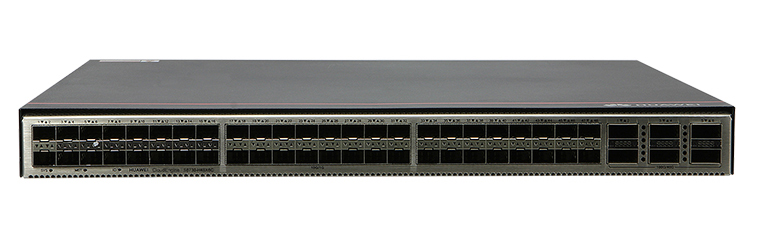
The S6730-H48X6C-V2 is a high-performance switch designed to meet the demands of modern data centers and enterprise networks. It offers advanced features and robust specifications to ensure reliable and efficient network operations.
Key Features
▪ High Port Density: Equipped with 48 × 10GE SFP+ ports and 6 × 40GE QSFP28 ports, providing extensive connectivity options.
▪ Flexible Uplink Options: Supports optional licenses for upgrading 40GE ports to 100GE QSFP28, allowing for scalable network growth.
▪ Advanced Cooling System: Utilizes pluggable fan modules for efficient forced air cooling, ensuring optimal performance under heavy workloads.
▪ Redundant Power Supply: Features two power module slots supporting 1+1 redundancy with pluggable AC and DC power modules, enhancing reliability.
▪ Comprehensive Management Interfaces: Includes RJ45 console and management ports, along with USB support for versatile management options.
Technical Specifications
Dimensions: 43.6 mm x 442.0 mm x 420.0 mm (1.72 in. x 17.40 in. x 16.54 in.)
Weight with Packaging: 9.2 kg (20.28 lb)
Memory: 4 GB
Flash Memory: Physical space: 2 GB
Typical Power Consumption: 165 W
Number of Power Slots: 2
Number of Fan Modules: 4
Redundant Power Supply: 1+1 Pluggable AC and DC power modules
Console Port: RJ45
Management Port: RJ45
USB Support: Supported
Applications
The S6730-H48X6C-V2 is ideal for:
▪ Data Center Aggregation: Serving as a high-density aggregation switch in data center environments.
▪ Enterprise Core Layer: Functioning as a core switch in enterprise networks, providing high-speed connectivity and advanced features.
▪ Campus Network Aggregation: Acting as an aggregation switch in campus networks, supporting various services and applications.
Conclusion
The S6730-H48X6C-V2 switch offers a comprehensive solution for organizations seeking high-performance, scalable, and reliable network infrastructure. Its advanced features and robust specifications make it a suitable choice for various networking scenarios.
Huawei CloudEngine S6730-H48X6C Switches
Huawei All Series Switches New and Used
For Cisco product list and quote, please visit: https://www.hi-network.com/categories/cisco or contact us at www.hi-network.com (Email: [email protected])
S6730-H48X6C-V2 Overview
Table 4-9 Basic information about the S6730-H48X6C-V2
| Item | Details |
|---|---|
| Description | S6730-H48X6C-V2 (48*10GE SFP+ ports, 6*40GE QSFP28 ports, optional license for upgrade to 6*100GE QSFP28, without power module) |
| Part Number | 02354HHT |
| Model | S6730-H48X6C-V2 |
| First supported version | V600R022C00 |
| Remarks | By default, QSFP28 optical ports work at 40 Gbit/s. A 100GE RTU license can be used to upgrade the port rate to 100 Gbit/s. To configure the ports to work at 100 Gbit/s, run the license active command to activate the license, and then run the active port-license and port mode 100GE interface commands. |
Components
Figure 4-4 S6730-H48X6C-V2 appearance

| 1 | Forty-eight 10GE SFP+ ports | 2 | NOTE: |
| 3 | NOTE:It is used with a ground cable. | 4 | NOTE: |
| 5 | One console port | 6 | One ETH management port |
| 7 | One USB port | 8 | NOTICE: |
| 9 | NOTE: | 10 | NOTE: |
| 11 | NOTE: | 12 | NOTE: |
| 13 | NOTE: | 14 | NOTE: |
Ports
Table 4-10 Ports on the S6730-H48X6C-V2
| Port | Connector Type | Description | Available Components |
|---|---|---|---|
| 10GE SFP+ optical port | SFP+ | A 10GE SFP+ Ethernet optical port supports auto-sensing to 1000 Mbit/s. It sends and receives service data at 1000 Mbit/s or 10 Gbit/s. | GE eSFP optical modulesGE-CWDM eSFP optical modulesGE-DWDM eSFP optical modulesGE SFP copper module10GE SFP+ optical modules10GE-CWDM SFP+ optical modules10GE-DWDM SFP+ optical modules10GE SFP+ copper module (supported in V600R023C10 and later versions)1 m, 3 m, 5 m, and 10 m SFP+ high-speed copper cables (only used for stack connection in versions earlier than V600R023C00)3 m and 10 m SFP+ AOC cables0.5 m and 1.5 m SFP+ dedicated stack cables (only used for stack connection; zero-configuration stacking supported from V600R023C00) |
| 40GE/100GE QSFP28 optical port | QSFP28 | By default, QSFP28 optical ports work at 40 Gbit/s. A 100GE RTU license can be used to upgrade the port rate to 100 Gbit/s. To configure the ports to work at 100 Gbit/s, run the license active command to activate the license, and then run the active port-license and port mode 100GE interface commands.QSFP28 optical ports cannot be split. | 40GE QSFP+ optical modules1 m, 3 m, and 5 m QSFP+ to QSFP+ high-speed copper cables (only used for stack connection in versions earlier than V600R023C00)10 m QSFP+ to QSFP+ AOC cable100GE QSFP28 optical modules (supported with a license loaded)1 m QSFP28 to QSFP28 high-speed copper cables (only used for stack connection in versions earlier than V600R023C00, supported with a license loaded)10 m QSFP28 to QSFP28 AOC cable (supported with a license loaded)2 m QSFP28 dedicated stack cable (only for zero-configuration stacking, supported in V600R023C00 and later versions) |
| Console port | RJ45 | The console port is connected to a console for on-site configuration. | Console cable |
| ETH management port | RJ45 | You can connect a switch to a configuration terminal or network management workstation through the ETH management port to configure the switch locally or remotely. | Ethernet cable |
| USB port | USB 2.0 Type A | The USB port can have a USB flash drive connected to upgrade the switch, or transfer configuration files or other files. The USB port can only connect to a USB flash drive that complies with USB 2.0.USB flash drives from different vendors differ in model compatibility and drivers. If a USB flash drive cannot be used, try to replace it with another one from a mainstream vendor. | USB flash drive |
Indicators and Buttons
Figure 4-5 Indicators on the switch
| No. | Indicator | Name | Color | Status | Description |
|---|---|---|---|---|---|
| 1 | SYS | System status indicator | - | Off | The system is not running. |
| Green | Fast blinking | The system is starting. | |||
| Green | Steady on | During the system startup preparation phase, the SYS indicator is steady green, which lasts for a maximum of 30 seconds. | |||
| Green | Slow blinking | The system is running normally. | |||
| Red | Steady on | A fault that affects services has occurred and it cannot be rectified automatically (critical alarm about hardware). | |||
| 2 | MST | Stack indicator | - | Off | The switch is not the master switch in a stack. |
| Green | Blinking | The switch is the master switch in a stack or a standalone switch. | |||
| 3 | ID | ID indicator | - | Off | The ID indicator is not used (default state). |
| Blue | Steady on | The indicator identifies the switch to maintain. The ID indicator can be turned on or off remotely to help field engineers find the switch to maintain. | |||
| 4 | - | NOTE: | Meanings of service port indicators vary in different modes. For details, see Table 4-12 and Table 4-13. | ||
| 5 | - | NOTE: | |||
| 6 | L/A | ETH port indicator | - | Off | The ETH port is not connected. |
| Green | Steady on | The ETH port is connected. | |||
| Green | Blinking | The Eth port is sending or receiving data. | |||
| 7 | USB | USB-based deployment indicator | - | Off | No USB flash drive is installed, or the indicator fails. |
| Green | Steady on | USB-based deployment succeeds. If there is no deployment configuration file, deployment will be repeatedly performed. In this case, the indicator is also steady green. | |||
| Green | Blinking | USB-based deployment is in progress. | |||
| Red | Steady on | USB-based deployment fails. | |||
Table 4-12 Description of service port indicators in different modes (two indicators for each port)
| Display Mode | Color | Status | Description |
|---|---|---|---|
| Default mode (LINK indicator) | Green | Off | The port is not connected or has been shut down. |
| Green | Steady on | A link has been established on the port. | |
| Default mode (ACT indicator) | Yellow | Off | The port is not sending or receiving data. |
| Yellow | Blinking | The port is sending or receiving data. | |
| NOTE: | - | Off | The port is not connected or has been shut down. |
| Green | Steady on | 1GE/10GE SFP+ port: The port is operating at 1 Gbit/s.1GE/10GE/25GE SFP28 port: The port is operating at 1 Gbit/s or 10 Gbit/s. | |
| Green | Blinking | 1GE/10GE SFP+ port: The port is operating at 10 Gbit/s.1GE/10GE/25GE SFP28 port: The port is operating at 25 Gbit/s. |
Table 4-13 Description of service port indicators in different modes (one indicator for each port)
| Display Mode | Color | Status | Description |
|---|---|---|---|
| Default mode | - | Off | The port is not connected or has been shut down. |
| Green | Steady on | A link has been established on the port. | |
| Green | Blinking | The port is sending or receiving data. | |
| NOTE: | - | Off | The port is not connected or has been shut down. |
| Green | Steady on | 40GE/100GE QSFP28 port: The port is operating at 40 Gbit/s. | |
| Green | Blinking | 40GE/100GE QSFP28 port: The port is operating at 100 Gbit/s.40GE QSFP+ port: The port is operating at 40 Gbit/s. |
Power Supply System
The switch can use a single power module or two power modules for 1+1 power redundancy. Pluggable AC and DC power modules can be used together in the same switch.
Heat Dissipation System
The switch uses pluggable fan modules for forced air cooling. Air flows in from the front side and exhausts from the rear panel.


This figure only shows the airflow direction and does not depict the actual device.
Technical Specifications
Table 4-14 Technical specifications of the S6730-H48X6C-V2
| Item | Specification |
|---|---|
| Dimensions without packaging (H x W x D) [mm(in.)] | Basic dimensions (excluding the parts protruding from the body): 43.6 mm x 442.0 mm x 420.0 mm (1.72 in. x 17.40 in. x 16.54 in.)Maximum dimensions (the depth is the distance from ports on the front panel to the parts protruding from the rear panel): 43.6 mm x 442.0 mm x 446.0 mm (1.72 in. x 17.40 in. x 17.56 in.) |
| Dimensions with packaging (H x W x D) [mm(in.)] | 175.0 mm x 650.0 mm x 550.0 mm (6.89 in. x 25.59 in. x 21.65 in.) |
| Chassis height [U] | 1 U |
| Chassis material | Metal |
| Weight without packaging [kg(lb)] | 5.84 kg (12.87 lb) |
| Weight with packaging [kg(lb)] | 9.2 kg (20.28 lb) |
| Typical power consumption [W] | 165 W |
| Typical heat dissipation [BTU/hour] | 563 BTU/hour |
| Maximum power consumption [W] | High temperature 45°C (113°F), 100% traffic, and dual power modules: 207 WHigh temperature 45°C (113°F), 100% traffic, long-distance optical module, 100% fan speed, and dual power modules: 291 W |
| Maximum heat dissipation [BTU/hour] | High temperature 45°C (113°F), 100% traffic, and dual power modules: 706.30High temperature 45°C (113°F), 100% traffic, long-distance optical module, 100% fan speed, and dual power modules: 992.92 |
| Static power consumption [W] | 97 W |
| MTBF [years] | 56.87 years |
| MTTR [hours] | 2 hours |
| Availability | > 0.99999 |
| Noise at normal temperature (acoustic power) [dB(A)] | 65 dB(A) |
| Noise at normal temperature (acoustic pressure) [dB(A)] | 52 dB(A) |
| Number of card slots | 0 |
| Number of power slots | 2 |
| Number of fans modules | 4 |
| Redundant power supply | 1+1Pluggable AC and DC power modules can be used together in the same switch. |
| Long-term operating temperature [°C(°F)] | -5°C to +45°C (23°F to 113°F) at an altitude of 0-1800 m (0-5906 ft.) |
| Restriction on the operating temperature variation rate [°C(°F)] | When the altitude is 1800–5000 m (5906–16404 ft.), the highest operating temperature reduces by 1°C (1.8°F) every time the altitude increases by 220 m (722 ft.).Devices cannot start when the temperature is lower than 0°C (32°F).When the QSFP-100G-ER4 optical module is used, the operating temperature ranges from -5°C to +40°C (23°F to 104°F). |
| Storage temperature [°C(°F)] | -40°C to +70°C (-40°F to +158°F) |
| Long-term operating relative humidity [RH] | 5% to 95%, noncondensing |
| Long-term operating altitude [m(ft.)] | 0-5000 m (0-16404 ft.) |
| Storage altitude [m(ft.)] | 0-5000 m (0-16404 ft.) |
| Power supply mode | Pluggable power supply |
| Rated input voltage [V] | AC input: 100 V AC to 240 V AC; 50/60 HzHigh-voltage DC input: 240 V DCDC input: –48 V DC to –60 V DC |
| Input voltage range [V] | AC input: 90–290 V AC; 45–65 HzHigh-voltage DC input: 190 V DC to 290 V DCDC input: -38.4 V DC to -72 V DC |
| Maximum input current [A] | The current specifications depend on the pluggable power modules in use. For details, see the related power module specifications. |
| Memory | 4 GB |
| Flash memory | Physical space: 2 GB |
| Console port | RJ45 |
| Eth Management port | RJ45 |
| USB | Supported |
| RTC | Supported |
| RPS input | Not supported |
| Service port surge protection [kV] | - |
| Power supply surge protection [kV] | AC power module configured: ±6 kV in differential mode, ±6 kV in common modeDC power module configured: ±2 kV in differential mode, ±4 kV in common mode |
| Ingress protection level (dustproof/waterproof) | IP20 |
| Types of fans | Pluggable |
| Heat dissipation mode | Heat dissipation with fan, intelligent fan speed adjustment |
| Airflow direction | Air intake from front, air exhaustion from rear (front-to-rear) |
| PoE | Not supported |
| Certification | EMC certificationSafety certificationManufacturing certification |